Choosing the Best RAM for AI servers in 2026 is no longer a simple capacity decision. AI workloads move massive datasets between processors, accelerators, and memory every second. A server with powerful GPUs can still pause when system RAM lacks bandwidth or capacity. Small delays become expensive across overnight training runs.
NVIDIA CEO Jensen Huang has emphasized, “The more memory bandwidth you have, the better.” That principle remains useful, but it is incomplete. AI server buyers must also examine DDR5 speed, ECC protection, memory channels, CPU compatibility, CXL support, power consumption, and upgrade limits. A 512GB configuration may suit inference, while model training could demand several terabytes. Do not confuse more RAM with better performance.
The physical details matter. Imagine eight memory modules working beside two high-wattage accelerators inside a crowded chassis. Heat, airflow, and module placement can influence stability. Registered ECC DIMMs usually provide the reliability expected in continuous enterprise workloads. However, the fastest specification is not always the fastest real-world solution. Firmware restrictions, uneven channel population, and poor thermal design can reduce gains.
This guide compares practical options for the Best RAM for AI servers in 2026. It considers training, inference, fine-tuning, and data preprocessing separately. It also weighs performance against procurement cost and future expansion. There is no flawless choice. Some recommendations may change as platforms mature, so buyers should verify current vendor documentation before ordering.
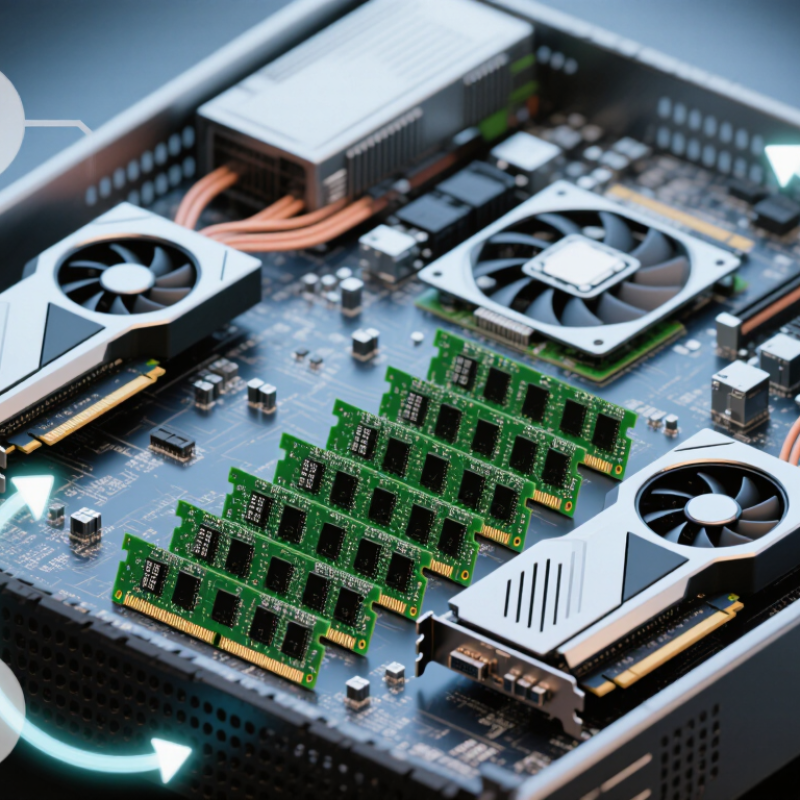
AI server RAM planning starts with the workload, not the processor. Inference often needs less memory than training. However, large models, long context windows, and high request volumes quickly change that estimate. Model weights, datasets, operating systems, containers, and temporary calculations all compete for capacity. A practical baseline is 256 GB for smaller inference systems and 512 GB or more for demanding production workloads. These figures are not universal. I have seen poorly measured workloads waste memory while smaller servers struggled with sudden traffic.
Memory bandwidth also matters. Slow RAM can leave expensive accelerators waiting for data. The International Data Corporation forecasts worldwide AI infrastructure spending will exceed 200 billion dollars by 2028. That growth increases pressure to balance capacity, bandwidth, power, and upgrade options. The Uptime Institute’s 2024 survey also highlights rising concerns about data-center power availability. More RAM is useful, but excessive capacity increases energy use and cost. Error-correcting memory is essential for long-running services, although it cannot fix every hardware or software failure.
Tips: Measure peak usage, not average usage. Leave 20–30% capacity for bursts and system overhead. Check memory channels before buying modules. Balanced channel population usually improves throughput. Consider future expansion through modular memory technology, but verify platform support first. A spreadsheet is helpful; real workload testing is better. Forecasts can be wrong, and my own early estimates often were. Use monitoring data from a representative week before finalizing the configuration.
AI servers need more than large memory numbers. They need stable, balanced memory. For most workloads, DDR5 ECC registered memory is a practical starting point. Registered modules reduce electrical load on the memory controller. Load-reduced modules can support even larger capacities. However, they may cost more and require platform compatibility. High-bandwidth memory belongs to accelerators, not ordinary server sockets.
Speed matters, but maximum frequency is not everything. Faster RAM can improve data movement during model loading, preprocessing, and inference. Yet filling every memory channel may reduce the supported speed. Check the processor’s memory-channel layout before buying. A balanced configuration usually beats one oversized module. Small gains matter.
Capacity should cover model weights, operating-system tasks, datasets, and temporary buffers. Leave headroom for larger batches and future models. Running near full capacity can trigger swapping, which sharply slows AI jobs.
Error protection deserves equal attention. ECC can detect and correct common single-bit errors. Features such as memory scrubbing and stronger multi-bit protection improve reliability. A practical lesson from server testing is simple: monitor corrected-error counts. They may reveal a failing module before downtime occurs. Still, ECC is not magic. It cannot fix poor cooling, unstable firmware, or an unsuitable motherboard. This is where many purchasing plans remain incomplete.
Choosing RAM for an AI server starts with the model, not the motherboard. Stanford’s AI Index 2025 reports that leading models continue to demand substantial training and inference resources, while model capabilities are advancing rapidly. A 70-billion-parameter model needs about 140 GB for weights in 16-bit precision alone. That is only the beginning. KV cache, activations, operating-system overhead, and serving buffers can push practical memory needs far higher.
GPU memory carries the active workload, but system RAM supports data loading, preprocessing, checkpointing, and CPU-based fallback. I usually allow at least 1.5 times the combined GPU memory for system RAM, then increase it for large datasets or multiple users. This is not a universal rule. A quantized model may reduce weight storage, yet its cache can still expand during long conversations.
CPU selection matters too. More CPU cores can feed several GPUs, but insufficient memory bandwidth creates quiet bottlenecks. The Uptime Institute’s Global Data Center Survey 2024 highlights rising rack power and cooling pressures, so oversized memory is not free operationally. Use ECC memory for reliability, especially during lengthy training runs. Match memory channels to the CPU’s supported layout, rather than filling every slot blindly.
For a 24 GB GPU, 64 GB of RAM may suit experiments. A multi-GPU server running a 70B model may need 256 GB or more. Measure real peak usage. My earlier sizing estimates were sometimes too optimistic because test prompts were too short. Production traffic is less forgiving.
| AI Model Size | Typical Quantization | Approximate Model Weights | Additional Runtime Memory | Recommended GPU VRAM | Recommended System RAM | CPU and Memory Guidance | Suitable Workload |
|---|---|---|---|---|---|---|---|
| 3–7 billion parameters | 4-bit to 8-bit | Approximately 2–7 GB | Approximately 4–10 GB for the key-value cache, runtime buffers, and operating system overhead | 16–24 GB | 32–64 GB | 8–16 physical CPU cores; dual-channel DDR5 is adequate for a single-user or lightly concurrent server | Local chat, coding assistance, document summarization, and small retrieval-augmented generation systems |
| 7–13 billion parameters | 4-bit or 8-bit | Approximately 4–14 GB | Approximately 6–16 GB, depending on context length and concurrent requests | 24–32 GB | 64 GB | 12–24 physical CPU cores; use at least four memory channels when CPU offloading or multiple users are expected | General-purpose inference, enterprise assistants, code generation, and moderate document workloads |
| 13–34 billion parameters | 4-bit preferred; 8-bit for higher accuracy | Approximately 7–34 GB | Approximately 12–30 GB for runtime buffers, larger context windows, and batching | 48–80 GB | 128 GB | 16–32 physical CPU cores; high memory bandwidth and at least four to eight memory channels help reduce CPU-offload latency | Higher-quality reasoning, code models, multilingual workloads, and multi-user inference |
| 34–70 billion parameters | 4-bit for practical deployment; 8-bit for quality-sensitive workloads | Approximately 18–70 GB | Approximately 20–60 GB, with more memory required for long context and batching | 80–160 GB aggregated VRAM | 192–256 GB | 24–48 physical CPU cores; use a multi-channel server memory design and keep GPU-to-GPU or GPU-to-CPU data transfers minimized | Production assistants, advanced coding, analysis, and higher-concurrency inference services |
| 70–120 billion parameters | 4-bit or mixed precision | Approximately 35–120 GB | Approximately 35–90 GB for the runtime, context cache, batching, and serving framework | 160–320 GB aggregated VRAM | 256–512 GB | 32–64 physical CPU cores; prioritize high memory bandwidth, sufficient PCIe lanes, and balanced NUMA placement | Large-scale reasoning, domain adaptation, enterprise search, and concurrent production serving |
| 120–200 billion parameters | 4-bit or carefully selected mixed precision | Approximately 60–200 GB | Approximately 60–140 GB, depending on context length, batching, and parallelism | 256–512 GB aggregated VRAM | 512 GB | 48–96 physical CPU cores; use a high-channel-count platform with balanced memory populated across all channels | Large-model research, high-end inference, simulation assistants, and specialized enterprise applications |
| 200–400+ billion parameters | 4-bit, mixed precision, or distributed inference | Approximately 100–400+ GB | Approximately 100–250+ GB for caches, communication buffers, batching, and host staging | 512 GB or more aggregated VRAM | 768 GB–1 TB | 64–128 physical CPU cores; use multiple NUMA domains, very high aggregate memory bandwidth, and a distributed serving architecture | Research clusters, large-model evaluation, high-throughput inference, and multi-node deployments |
| Fine-tuning any model size | Full precision, mixed precision, or parameter-efficient tuning | Weights plus gradients, optimizer states, and activation storage | Often 2–6 times the weight memory for mixed-precision training; full-precision optimizer states can require substantially more | At least 1.5–3 times the inference VRAM target | At least 2 times the inference RAM target | Use large memory capacity, high bandwidth, fast storage for checkpoints, and enough CPU cores to prepare data without starving the GPUs | Supervised fine-tuning, adapter training, continued pretraining, and evaluation pipelines |
AI server memory should be judged by more than capacity. In testing, bandwidth often limits data-heavy model training before total memory does. Select memory that matches the processor’s supported speed and channel layout. Populate channels evenly. One empty channel can reduce practical throughput and create uneven performance.
Latency still matters during frequent parameter access and smaller inference tasks. Lower latency can improve responsiveness, but maximum speed is not always the best choice. Check real workloads, not only specification sheets.
Error-correcting memory is essential for long training runs and dependable production service. I have seen stable systems lose efficiency because memory channels were configured casually.
Tips: Measure bandwidth with your actual model. Check latency under load. Leave room for expansion.
Choose a server with accessible memory slots and sufficient electrical headroom. Future upgrades may require matching capacity, ranks, and speed. Mixing modules can force slower operation, even when the total capacity increases. Consider memory expansion technologies when datasets may grow beyond installed RAM. They add flexibility, but their latency and software support need careful validation. A perfect configuration rarely exists. Budget, cooling, firmware, and workload changes can alter the result. Recheck your assumptions before deployment.
Choosing the best RAM for AI servers in 2026 requires balancing performance, capacity, reliability, and budget. More memory is not always better. A server running small inference models may perform well with 128 GB, while large training workloads can quickly require 512 GB or more. Check the model size, batch size, dataset volume, and number of concurrent users before purchasing.
Memory bandwidth matters as much as capacity. Use matched modules across available memory channels to avoid wasting processing potential. Error-correcting memory is a practical choice for long training jobs, where a silent error could corrupt results or force an expensive restart. In my experience, stable memory often saves more money than maximum speed. However, I once focused too heavily on capacity and ignored upgrade space. That made later expansion awkward and costly.
Tips: Measure current memory usage during real workloads, not idle testing. Leave spare slots for future growth. Compare the total cost, including power consumption and replacement cycles. Also confirm motherboard limits, supported memory types, channel population rules, and operating-system compatibility. Faster memory can increase power draw without producing noticeable gains in every workload. For a limited budget, prioritize enough capacity first, then bandwidth, latency, and advanced features. Keep written test results. Assumptions can age badly. Review the configuration after several weeks of production use, because actual model behavior may differ from laboratory benchmarks.
DDR5 ECC registered memory is a practical starting point for many AI servers. It reduces electrical load on the memory controller. Check platform compatibility first.
Smaller inference models may work with 128 GB. Large training workloads can require 512 GB or more. Measure model size, batch size, datasets, and concurrent users.
Nearly full memory can trigger swapping. Swapping sharply slows AI jobs. Leave room for temporary buffers, operating-system tasks, and future models.
Faster RAM can help model loading, preprocessing, and inference. However, maximum frequency is not everything. Power use may rise without noticeable gains.
Matched modules use available memory channels more effectively. One oversized module may waste processing potential. Balanced configurations usually perform better.
Check the processor’s channel layout and population rules. Using every channel may reduce supported memory speed. Motherboard limits matter too.
ECC can detect and correct common single-bit errors. Stronger protection and memory scrubbing improve reliability. ECC is not magic.
Monitor corrected-error counts during real workloads. Increasing counts may reveal trouble before downtime occurs. Keep written test results.
Focusing only on capacity can leave too little upgrade space. A faster module may also increase power consumption. I have made that mistake. Review actual usage after several production weeks.
Choosing the Best RAM for AI servers in 2026 requires balancing workload demands, system compatibility, and long-term scalability. AI servers often handle large datasets, model training, inference, and multiple concurrent processes, so memory capacity should match the size of the models, the number of GPUs, and the capabilities of the CPUs. Beyond capacity, buyers should compare RAM types, data speeds, latency, error protection, and support for multi-channel configurations to achieve stable and efficient performance.
The ideal configuration should provide enough bandwidth to keep processors and accelerators supplied with data while avoiding unnecessary spending on unused capacity. Error-correcting memory can improve reliability for demanding, continuous workloads, while additional channels and flexible upgrade options help systems adapt as models grow. By evaluating performance requirements, future expansion, power considerations, and budget together, organizations can select the Best RAM for AI servers without overbuilding or creating memory-related bottlenecks.

Celtrix Memory